Tuesday, May 8, 2012

some problems and questions about X360dock


   When you install the x360dock, please be attention some points:

1. All the cables must be connnected correctly and fastness, we will find "to drive", "to usb" and "to mainboard" on the module1, there are black and white cables, black to black, white to white. The soft cable is most important and a little diffcult to connect fastness, please drag it lightly after connect it and make sure it is fixed.

2. About the firmware, we must know that just the firmware is not enough, we need dvd key files. Every xbox360 has its own dvd key and the x360dock wholesale can not extract it right now. we need other tools such as ck3i and usb pro to extract the key files. But i don't recommend to buy them because you just need them to extract the key files once, then you can save the files forever and the tools will not be use anymore, that really not worthy. The best way i think is go to the modchip shop and ask the staff to extract the key files for you.

3. If you just have module1, put the firmware and key.bin files into the PC and operate your dock by pc.
   If you have module1 and module2, just put the key files in the TF card which we send to you, and please don't delete the old files which is in the TF card becasue that is the module 2 firmware and we put it before we send the module 2 out. Then you just need the touch screen to operate your x360dock, it is really very convenience.

Attention: because the module1 need operate x360dock by pc, it is a little complex
than use module2, and if your xbox360 is 0225 or 0401, you need reset your xbox once when you select a game. 

4. For the module2, don't forget there is a little black chip which need cover on the dongle, don't lost it and remeber to put it on the dongle.

The problem when you start dx360dock:

1. can not start xbox, the light is not light on and the fan doesn't turn.
   This is the problem of cable connection, please check all cables and find whether there is any bad connect. My suggestion is connnect all cables once again.

2. For the module1, can not read games, just read dvd or freeze.
   This problem because the white soft cables don't connect correctly. make sure the blue part is upward and the metal part is downward.

Attention: for the module1, when you start the xbox, the mainboard will light 3 light, 2 yellow and 1 red, when you insert the usb to the pc, the red one will quench and when you start a game, the red light will flashing.

Some question about x360dock:

1. Does the x360dock work on newest dashboard 14719?
   Yes, the module2 can work on 14719 with no problem and can play all XGD3 games. the module1 can work on 14719 with no problem but just can play old XGD3 games such as Gears of War.

2. Can x360dock play games on-line?
   There is no feedback that xbox is banned by playing x360dock on-line. you'd better not do that. no one know when the MS ban your xbox and no one can make sure MS will not do that in the future.

3. Can x360dock extract the dvd key?
   Sorry no. You need other tools or require help from modchip shop.

Thanks for reading!
  

Thursday, May 3, 2012

How to update the R4i sdhc 3DS to support 3DS v4.0.0-7?

What we need:

1 x wholesale R4I SDHC 3DS
1 x sd card
1 x card reader
1 x ds/dsl/dsi

Step1: Download the newest kernel v1.56b, unzip it and put all files into the root of sd card

Step2: put the sd card into r4, put r4 into dsl, then you will see the icon is like below:


Step3: Click the icon, choose the third selection:


Step4: Click the "upgrage"


Step5: Click the "start"


Step6: It will update by itself
Attation: do not power off during updating and make sure the power is full.


Step7: When the updating is finished, reboot console


Then you will find the icon is changed, and the updating is successful!

Enjoy your game!

Tuesday, April 24, 2012

How to transform your iphone's video to TV?


    I just found a new items named EchoRoamer, it is a wireless AV transmitter that allows you to transform your iphone's musics, photos, video, games and apps to the TV.

    You can check the official site and see more info: http://echoroamer.com

Here is a video which i found in youtube:


   The point is the last 2 users play game on-line.

Wednesday, April 18, 2012

X360dock module 2 released!

 
Too late for x360dock team. But the touch screen remote has been released finally.

According to the offficial of x360dock, the touch screen come out, support dashboard 14719 perfectly.

But please update your dashboard by usb not on-line. Once update on-line, the x360dock can not work anymore.

They also released the video, go to the official to see more details.

Thursday, April 12, 2012

JB-King counterattack! New firmware released!


     Remember True Blue's Anti Clone War? Since they pronounced start anti clone, If  the users use clone TB, the hdd data will be erased random. This made most of users discontented. But the biggest TB clone item: JB-King is not just wait for death. After no more than 3 days, the update package released!

     According to the official, this upgrade package is for protecting hdd data base. Things become interesting! For users, this is a good news! We dont need worry about the hdd data disappear. It is a free for users choose any jailbreak items they like. either True Blue or JB-King. Just because there is another competitor, TB block the users hdd, that is really bad.

    However, i understand why True Blue do this, but as i said before, there must have other good measurs to solve this problem, such as update quickly, jailbreak more games, develop a new function which the JB-King cant copy ect. Then the users will choose your product not others.  


    The follow is the JB-King newest firmware download, just enjoy:


JB-King firmware v2.51

Thursday, April 5, 2012

Attention: True Blue start to anti-clone! Good news? or Bad news?


Today's news. According to the official of True Blue, they made an announcement for anti-clone, the follow is the original news:

"A warning to those considering or having already purchased a True Blue clone: we have previously implemented special anti-clone technology in the True Blue firmware which accurately detects clones and when such a clone is detected, will activate one of several effects at random intervals, such as erasing the internal PS3 HDD. The recent JBKing 2.5 software update is especially affected by these measures; anyone using this clone will be subject to data loss as a result of random HDD erasure as well as other effects. Other anti-clone measures are now being developed and will be deployed shortly.
Clones of True Blue will be blocked and future EBOOT's will not function with such devices. It is therefore important that users, in the interests of enjoyment and to avoid wasting money on trivially detectable clones, should purchase only original True Blue devices."

First, I have to say, true blue is really expensive, but jb-king is cheap... also we know jb-king is a clone and if they want to sell good, they have to make price cheaper. But for users, we just want use less money to enjoy games.

On the other hand, TB is working hard on jailbreaking and if the technology is stolen, of couse they are very angry. For protecting their benefit, make an anti-clone measure is fair and reasonable. I have saw many comment on the forum and most people dont agree with their measure. Yes, we dont against protection, but we need a better modus operandi.

Sunday, April 1, 2012

How to transfer the dstt save data?

    I usually be asked that how to transfer the flash card save data?

    For example: If you use an r4 right now, and play the pokemon, then you bought a new flash card dstt, and want to use the dstt to play the save rom which you have played on r4, how to? Copy the sav. to dstt directly? No, that is no effect.... Another example: This is from the yahoo answer, "My DS broken, so I downloaded an emulator (Desmume) in order to continue playing through Pokémon HeartGold. However, my sister lent me her DS, so I want to transfer the .sav file which has been saved on the computer due to my playing the game on the emulator back onto the microSD card which goes in the DSTT cart. But, when I simply drag the .sav file from Desmume's Battery folder onto the microSD card, then load the game on the DSTT, it loads the save file which was on the card before I started playing on the emulator. How do I get the current save file onto the DSTT?"

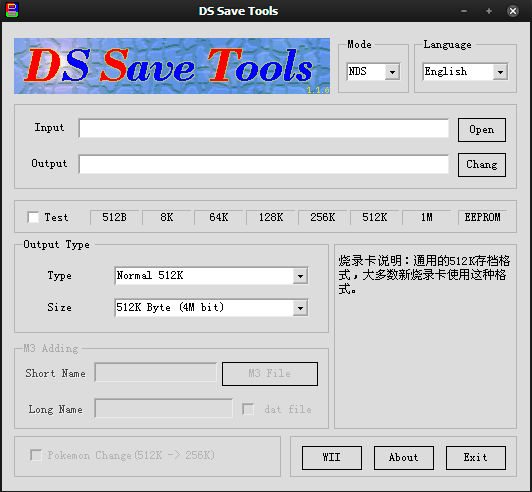
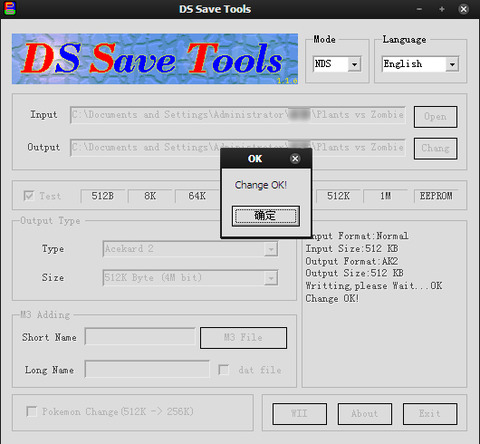
OK, let's solve these questions together. We can't use the same sav files in different flash cart or emulator, we need a transfer tools named: DS Save Tools.

Step 1: Download the tools here: DS Save Tools

Step 2: Unzip the file and start it


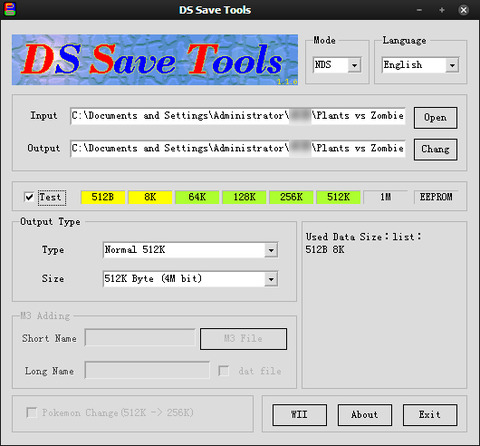
Step 3: Click the "OPEN" to lead the save file which you want transfer


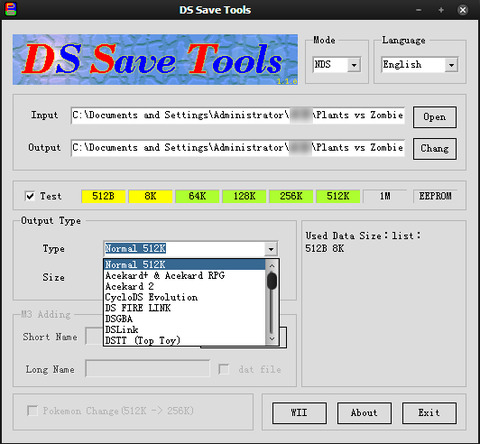
Step 4: Select the "Output" and the "Type", "Size" ect.


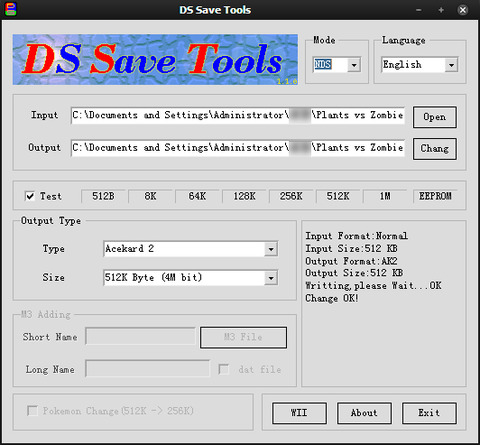
Step 5: Click the "CHANGE", then done!


Attention: Because R4i Gold 3DS / R4i gold / R4DS use the wood kernel, the wood kernel is develop with "AKRPG", if you need to transfer the save data to these 3 cards, choose the type "AKRPG". And for the DSTwo, choose "DSONE".

Thanks for reading!